
Download ProtoUI – AI‑Driven UI Code Generator for TailwindCSS
Overview
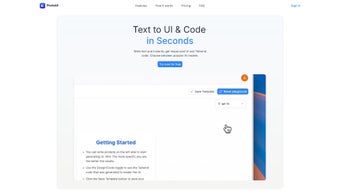
ProtoUI is an AI‑powered web application that reshapes the way frontend developers create responsive user interfaces. By converting plain English requirements into ready‑to‑use TailwindCSS code, ProtoUI eliminates the repetitive hand‑coding that traditionally slows down UI development. The platform offers a live preview pane, allowing developers to see changes instantly, and even supports an image‑to‑UI feature that can translate mockup screenshots into clean Tailwind markup. Although the current focus is on TailwindCSS, the roadmap promises support for raw HTML/CSS, JSX, and additional frameworks, making ProtoUI a future‑proof addition to any developer’s toolkit. Whether you are building a single‑page app, a marketing landing page, or a complex dashboard, ProtoUI speeds up the prototyping phase, reduces human error, and frees you to concentrate on higher‑level design decisions.
From a productivity standpoint, ProtoUI tackles three pain points that most developers encounter daily: (1) translating design specifications into code, (2) ensuring the generated UI is fully responsive across devices, and (3) iterating quickly without breaking the existing layout. By feeding a short description—such as “a dark‑mode card with a header, image, and call‑to‑action button”—ProtoUI instantly outputs the corresponding Tailwind classes, HTML structure, and a live rendering. The AI model behind the scenes has been trained on thousands of UI patterns, guaranteeing that the generated code follows best practices for accessibility, performance, and maintainability.
Because the tool runs entirely in the browser, there is no need to install heavyweight dependencies or manage local environments, making it a secure and hassle‑free solution for both solo freelancers and large development teams. The live preview updates in real time as you tweak parameters, allowing you to experiment with spacing, color palettes, and component variants without leaving the application. In addition, the free tier provides generous usage limits, while premium plans unlock higher limits, priority AI processing, and early access to upcoming framework support.
Key Features
- AI‑Generated TailwindCSS Code: Transform plain‑language UI specifications into clean, responsive Tailwind markup.
- Live Preview Pane: See instant visual feedback while you edit requirements or tweak generated code.
- Image‑to‑UI Conversion: Upload design mockups and receive Tailwind components that match the visual layout.
- Responsive Design Assurance: Built‑in checks guarantee that generated components adapt gracefully to mobile, tablet, and desktop breakpoints.
- Export Options: Download the generated HTML/CSS bundle, copy to clipboard, or directly integrate with your Git workflow.
- Version Roadmap: Upcoming support for raw HTML/CSS, JSX, and framework‑specific presets (React, Vue, Angular).
- Secure, Browser‑Based Operation: No local installation required; all processing happens client‑side, protecting your proprietary designs.
- Collaboration Friendly: Share a unique session URL with teammates for real‑time co‑editing and feedback.
- Customizable Theme Tokens: Adjust default color palettes, font families, and spacing scales to match your brand guidelines.
- Extensive Documentation & Community: Detailed guides, video tutorials, and a community forum for troubleshooting and sharing templates.
Each feature has been crafted with the modern frontend workflow in mind. For example, the “Export Options” list not only lets you download a zip file containing index.html and style.css, but also provides a ready‑to‑paste snippet for React’s JSX syntax once the future update lands. The “Customizable Theme Tokens” feature taps directly into Tailwind’s configuration, enabling you to define your own design system without leaving ProtoUI. This eliminates the back‑and‑forth between a local Tailwind config file and the UI generator, thereby reducing context switches and keeping the development pipeline smooth.
ProtoUI also prioritizes accessibility. The AI model incorporates ARIA attributes and semantic HTML best practices, ensuring that the generated components are not just visually appealing but also usable by assistive technologies. In practice, a button generated by ProtoUI will automatically include role="button" and appropriate aria‑label attributes when the description mentions its purpose. This attention to detail saves developers countless hours of manual compliance checks, especially when building products for regulated industries.
Looking ahead, the community‑driven roadmap includes a plugin system that will let power users contribute custom Tailwind utilities directly to the generator. Early adopters can already test beta versions of the JSX output and provide feedback through the integrated forum, ensuring that the next generation of ProtoUI aligns with real‑world development needs.
Installation & Usage Guide
Because ProtoUI is a cloud‑based web application, there is no traditional “installation” process. Users simply navigate to protoui.com, create a free account, and begin generating UI code immediately. The platform supports all major browsers—including Chrome, Edge, Firefox, and Safari—on Windows, macOS, Linux, as well as mobile browsers on Android and iOS. This cross‑platform compatibility ensures that developers can work from a laptop in the office or a tablet on the go without losing functionality.
Step‑by‑Step Usage
- Sign Up / Log In: Register with an email address or use a single‑sign‑on provider (Google, GitHub). Verification is instant, and you gain access to a personal dashboard where all your projects are stored.
- Create a New Project: Click “New UI” and give your project a descriptive name (e.g., “Landing Page Hero”). This creates a sandboxed workspace with a unique URL for sharing.
- Enter Requirements: In the left‑hand panel, type a concise description of the UI component you need. For example: “A responsive hero section with a headline, sub‑headline, background image, and two CTA buttons (primary and secondary).”
- Generate Code: Press the “Generate” button. Within seconds, ProtoUI returns a block of Tailwind‑HTML code and displays a live preview on the right.
- Iterate: Use the “Edit Prompt” field to refine your description or adjust individual Tailwind classes directly in the code editor. The preview updates in real time.
- Export: Once satisfied, click “Export.” Choose between “Download ZIP,” “Copy to Clipboard,” or “Push to GitHub.” The exported bundle includes an
index.htmlfile, a Tailwind‑compiledstyle.css, and aREADME.mdwith usage instructions. - Integrate: Drop the exported files into your existing project, or paste the snippet into a component file if you’re using a framework that supports Tailwind (e.g., Next.js, Nuxt).
For developers who prefer the image‑to‑UI workflow, simply click the “Upload Image” button, select a mockup, and let ProtoUI analyze the layout. The AI extracts key sections (header, image, text blocks) and generates a Tailwind component that mirrors the visual hierarchy. You can then fine‑tune the output by editing the automatically generated description or by manually adjusting Tailwind classes.
ProtoUI also offers a “Theme Sync” feature that lets you import an existing tailwind.config.js file. By uploading the configuration, the AI aligns its class suggestions with your custom design tokens, guaranteeing visual consistency across your product suite.
Supported operating systems: Windows 10/11, macOS 12+, Linux (any modern distro), Android 10+, iOS 13+ (via supported browsers).
Conclusion, Pros & Cons, FAQ & CTA
Pros
- Speeds up UI development by generating Tailwind code in seconds.
- Live preview eliminates the need for separate sandbox environments.
- Image‑to‑UI conversion bridges the gap between design and code.
- Browser‑based, no local installation or heavy dependencies.
- Built‑in accessibility recommendations ensure compliant output.
- Export options integrate seamlessly with Git workflows.
- Free tier available for hobbyists and small teams.
Cons
- Currently limited to TailwindCSS; other frameworks require future updates.
- AI may occasionally misinterpret ambiguous prompts, requiring manual adjustments.
- Performance depends on internet connection and browser capabilities.
- Advanced theming (e.g., custom plugins) not fully supported yet.
- Free plan includes usage limits on image‑to‑UI generation.
Frequently Asked Questions
Is ProtoUI really free to use?
ProtoUI offers a generous free tier that includes unlimited text‑to‑UI generation, live preview, and up to three image‑to‑UI conversions per month. Premium plans unlock higher usage limits, priority AI processing, and early access to upcoming framework support.
Can I integrate ProtoUI with my existing CI/CD pipeline?
Yes. Exported code can be committed to a repository and automatically built with Tailwind’s JIT compiler. ProtoUI also provides a webhook API that can trigger generation jobs from your pipeline, allowing you to keep UI components in sync with design specifications.
Does ProtoUI store my design data?
All user‑generated prompts and uploaded images are encrypted in transit and stored temporarily for processing only. Projects saved to your account are kept securely on the server, and you can delete them at any time from your dashboard.
What browsers are supported for the live preview?
ProtoUI works flawlessly on modern versions of Chrome, Edge, Firefox, and Safari. Mobile browsers on Android and iOS are also supported, though performance may vary slightly on older devices.
When will JSX and other framework outputs be available?
Beta support for JSX is already rolling out to premium users. Full production‑ready JSX, Vue, and Angular outputs are slated for release in Q2 2026, following extensive community testing.
ProtoUI dramatically reduces the time spent on repetitive UI tasks while keeping the generated code clean, maintainable, and standards‑compliant. If you are looking for a way to accelerate your TailwindCSS workflow without sacrificing quality, ProtoUI is a solid choice.
Ready to try it yourself? Visit ProtoUI today, sign up for the free tier, and start turning simple text prompts into production‑ready Tailwind components in moments.



.png)



